
How do I put a different image on every object in Blender?
The problem
You have forty picture frames, a shelf of book covers or a wall of cards, and each one needs its own image. In Blender a material points at a single image, and the Image Texture node offers no input that says which picture an individual instance should show. The usual ways out are one material per object, which gets heavy fast, or a hand-built texture atlas with a custom attribute and a pile of math nodes that you have to rebuild every time something changes.
Image Per Instance builds that setup for you. You point it at a folder, press Build Atlas, and every object, array element or Geometry Nodes instance can show a different image while sharing one material.
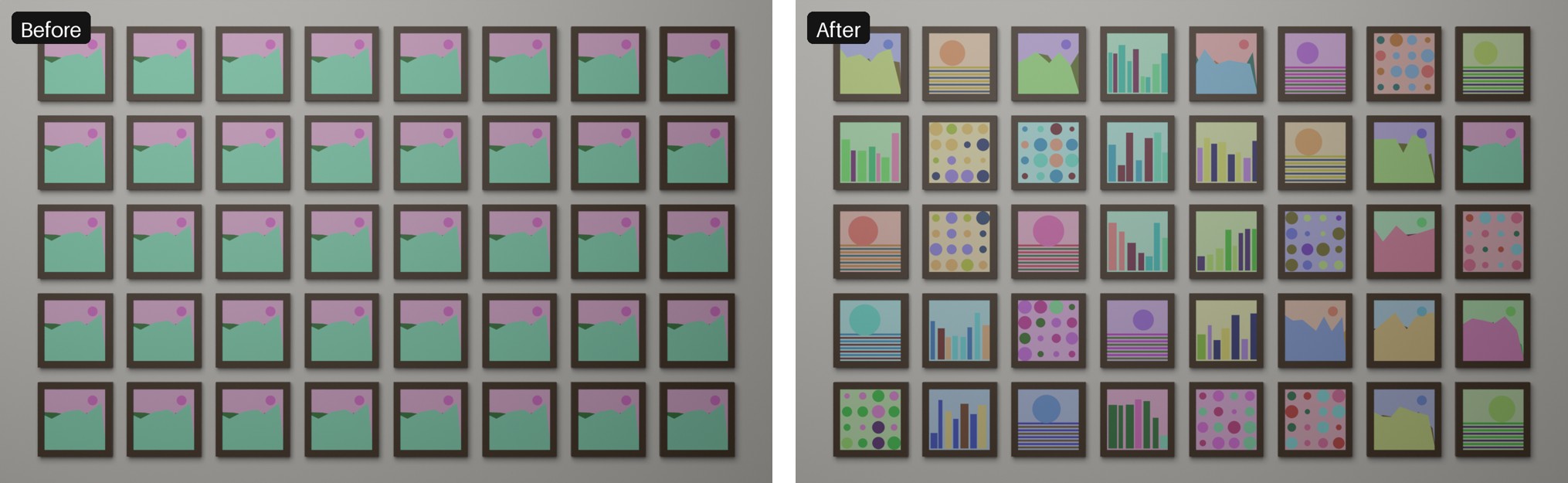
What it does
- Build Atlas reads every image in a folder, resizes each one into a tile, and packs them into a single atlas image stored inside your .blend file. The atlas is always in natural file-name order (
img2beforeimg10), so Image Number 3 is always the third file. - Apply To Selected Objects gives each selected mesh its own tile. The image index is stored as a custom property on the object.
- Add To Instances (Geometry Nodes) is for Instance on Points, the Array modifier and collection instances. It looks through the host's Geometry Nodes for the objects being instanced (Object Info and Collection Info nodes, including nested groups), puts the shared material on them, and adds a modifier called IPI Assign Index to the host. That modifier writes an image number onto every instance, and the material reads it.
- Order can be "By file name" or "Shuffle". Shuffle uses every image once before any repeats, and a Seed field gives you other arrangements.
One material, one atlas, and the material is made of ordinary Blender nodes.
Beyond the basics (full version)
- Tile shape and fit: pick a tile shape (1:1, 2:3, 3:2, 3:4, 4:3, 16:9, 9:16) and a fit mode (Stretch, Fit with bars in a colour you choose, or Fill with crop) so pictures are not squashed.
- Choose images yourself: pick an image by number or by name, or use Match By Object Name so an object called
poster_catshowscat.png. - Material options: use image alpha, make the image glow like a screen, set roughness.
- Mapping without UVs: project from the front, top or side across the whole object.
- Animate: every object steps through the images every N frames, each starting at its own image.
- Random variation: shift hue, saturation and brightness per object, and mirror a random half of the objects.
Every control is listed in the panel reference.
What you can use it for
Book spines and covers, posters, paintings and photo frames, cards and tiles, packaging and props, video-wall panels and billboards, and anything scattered or arrayed with Geometry Nodes. Step-by-step recipes are in the workflows page, and the guide different image per instance in Blender shows the manual method first.
Honest limits
- One atlas per .blend file. Pressing Build Atlas again replaces it, and objects keep their pictures by file name. See rebuilding the atlas.
- The atlas can be at most 16384 px on each side. For example 256 images at 1024 px fit exactly, 257 do not. See the atlas size limit.
- Front, Top and Side mapping projects straight through the object's bounding box from one direction. Faces that turn away from that direction smear the image into streaks, so give such objects a UV map. See streaked faces.
- With few images the Shuffle order can show a visible rhythm. See repetitive shuffle.
- The image goes on material slot 1 of each object. Other slots stay untouched.
- Assign Image To Selected and Match By Object Name work on separate objects, not on Geometry Nodes instances. See no instanced source found.
- It is not a replacement for UDIM or texture painting.
More cases are covered in troubleshooting.
Built and tested by Pavel at Mendbox Studio (about).
Requirements
Blender 4.2 or newer. The add-on's test scripts run on Blender 4.2.23 LTS, 4.5.14 LTS and 5.2.2 LTS. The add-on is pure Python, needs no internet and no extra software, and is licensed GPL-3.0-or-later.
Free Lite version
Image Per Instance Lite is a separate free download. It has Build Atlas and Apply To Selected Objects for separate objects, with up to 20 images. Instances, Shuffle, fit modes, assign by name, alpha and emission, mapping without UVs, animation and variation are in the full version only. Get Lite on GitHub, and see the install page for the differences.
How to buy
The full version is $12. Buy it on Gumroad or Superhive, then install the zip in Blender as described in the install guide. The full documentation lists every page, including the changelog.