
How do I split a big model to fit my print bed?
The problem
You have a helmet, a statue, a piece of terrain or an AI-generated figure, and it is larger than your printer bed. A 220 mm bed does not care that the model looks great on screen. You need to cut it, keep every part inside the build volume, and make sure the parts line up when you glue them. Doing that by hand means placing planes, running booleans, fixing the holes the booleans leave, modelling pins and sockets, and rotating every piece so it lies flat. For a model that needs six or eight parts, that is an evening.
What BedSplit does
BedSplit is a Blender add-on with one sidebar tab. You pick a printer, press Split to Bed, and it does the rest:
- Fits the bed. It counts how many slabs each axis needs for the printer's width, depth and height, and places flat cuts along X, Y and Z. Positions are nudged away from spots where the cross-section is too small to hold a dowel.
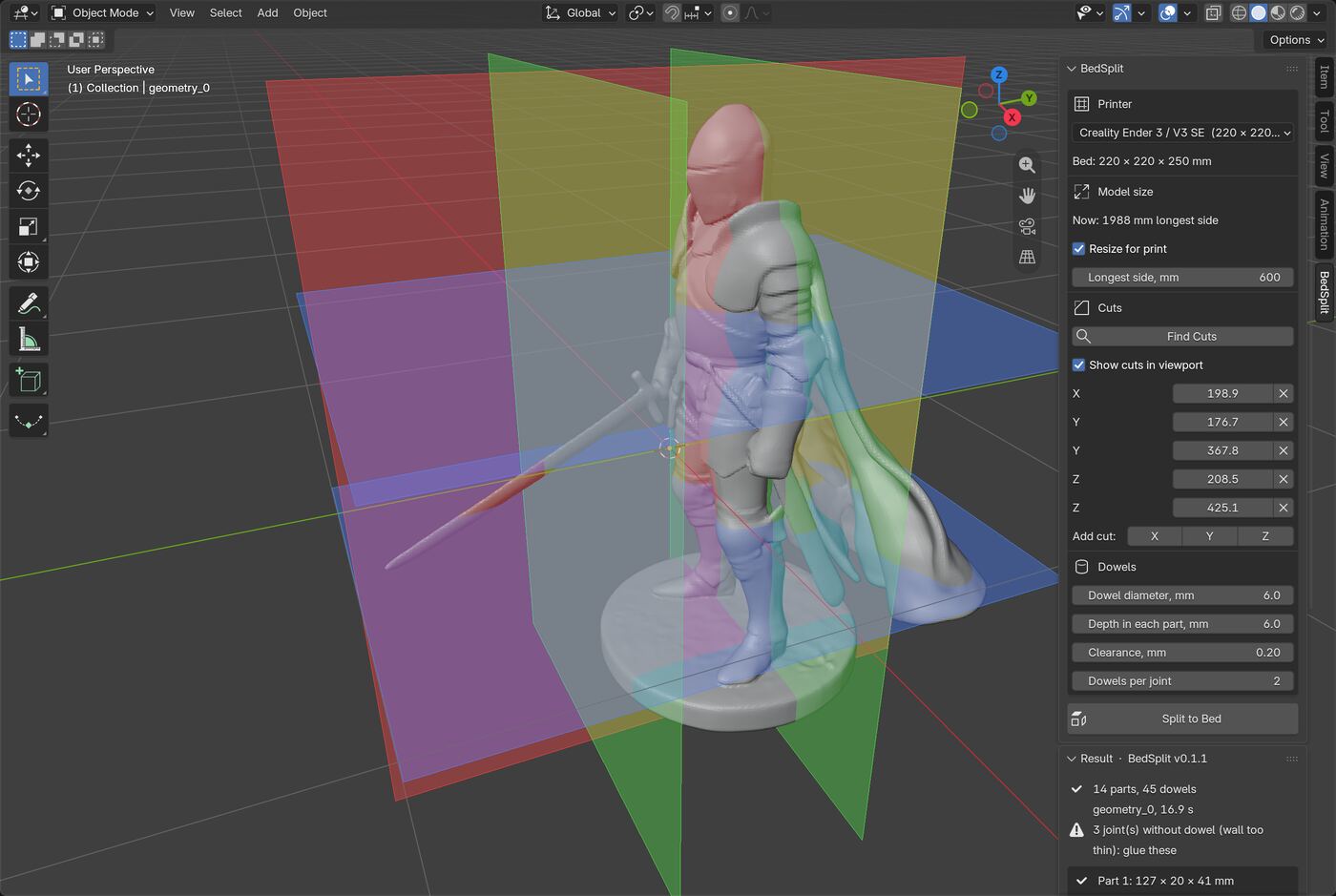
- Cut planes you can move. Find Cuts shows the planes in the viewport. You can change any position in millimetres, add a cut on X, Y or Z, or remove one, then split. This is how you keep a cut off a face or a hand.
- Dowel sockets. Every joint gets round sockets in both faces, plus one dowel mesh to print as many times as the name says. You set diameter, depth, clearance and the number of dowels per joint.
- Mesh repair first. Holes, flipped normals, loose geometry, overlapping shells and non-manifold edges are fixed before cutting. The result panel tells you what was repaired and warns when the surface had to be rebuilt.
- Parts laid flat. Each part is turned so its largest cut face sits on the ground, then placed beside your model in its own colour. Your original object is not changed.
- Checks you can read. For every part the panel shows its size in millimetres and a check mark when it fits the bed and is closed.
- Per-part STL export. One STL per part in millimetres, plus one dowel file.
Details for every control are in the panel reference.
Printer presets
The preset list holds 18 printers, or you can type any bed size:
| Brand | Presets |
|---|---|
| Bambu Lab | A1 mini, A1 / P1 / X1, H2D |
| Prusa | MINI+, MK4 / MK3, XL, CORE One |
| Creality | Ender 3 / V3 SE, K1, K1 Max, Ender 5 Plus |
| Anycubic | Kobra 2, Kobra 3 |
| Elegoo | Neptune 4, Neptune 4 Max |
| Sovol | SV06 |
| Voron | 2.4 300, 0.2 |
The exact sizes are in the panel reference.
Resize for print
If your model is a 2 m sculpt in Blender units, scale does not need to be solved first. Turn on Resize for print, type the real length of the longest side in millimetres, and BedSplit works at that size. Leave it off and the model is read at its current scale, using the scene unit scale.
Honest limits
Each limit links to the troubleshooting entry that explains what to do about it.
- Flat axis-aligned cuts only. Planes run along X, Y and Z. You can slide them, add them and remove them, but you cannot tilt them, and there are no curved or seam-following cuts. If a cut has to avoid a face, move it a few millimetres. See parts still larger than the bed.
- One joint type. Joints are round dowels. There are no dovetails, magnet pockets or snap fits.
- Thin sections get no dowel. A socket needs 1.6 mm of material around it in both parts. With the default 6 mm dowel and 0.2 mm clearance, that means a cross-section of roughly 10 mm. Thinner joints stay flat, and the panel counts them so you can glue them. See joints without a dowel.
- Badly broken meshes are rebuilt, not mended. When a light repair cannot make the mesh a clean solid, BedSplit rebuilds the surface with a voxel remesh. That closes every gap but rounds off fine detail. The panel gives the deviation in millimetres and shows a heavy-repair warning when more than 1 percent of the surface moved by over 0.5 mm. In Pavel's own test meshes, downloaded and AI-generated models among them, most passed every check and a few needed the rebuild and lost visible detail. See holes and non-manifold meshes.
- A 64-part ceiling. If the bed would need more than 64 parts, BedSplit stops and asks you to check the scale. A figure that really needs 64 pieces is rare, whereas a model in metres read as millimetres is common, so the ceiling catches the mistake before it becomes a minute of cutting. Use Resize for print to fix it. See the scale message.
- Dense meshes take a while. The cut itself is usually quick. A mesh with millions of faces, or one that needs a rebuild, can take half a minute, and the cursor shows it is working. See slow splits.
- Built for filament printing. There is no hollowing, no support generation and no 3MF export, so a resin printer gets solid parts and you hollow them in your slicer.
- Fit depends on your printer. The exported parts were sliced in PrusaSlicer to confirm they are closed, but printers over- or under-extrude differently, so print one small joint before a long job. See dowels too tight or too loose.
Requirements
Blender 4.2 or newer, installed as an extension. It was tested on 4.2, 4.5 and 5.2. It writes STL files only when you press Export STL. See installation.
Free Lite version
BedSplit Lite is a separate, free, open-source extension. It has the printer presets, Resize for print, Split to Bed with flat cuts and capped, closed parts, parts laid flat and per-part STL export. It does not have dowels and sockets, mesh repair, Find Cuts, movable planes or the dowel settings. If your model is already watertight and you glue the parts, Lite may be all you need. Download it from the BedSplit Lite releases page.
How to buy
BedSplit costs $22 and is sold on Gumroad. Updates are free. You get a zip file that you install from disk in Blender, without unzipping it. Questions can go through the contact page.
Learn more
Built and tested by Pavel at Mendbox Studio (about).
- Overview of the documentation
- Install BedSplit
- Panel reference
- Step-by-step workflows
- Troubleshooting
- Version history
- Guide: how to split a model for 3D printing, including the manual method in plain Blender